📋 Vendo Address List
An Address List in MikroTik is a dynamic collection of IP addresses that can be referenced in firewall rules. Creating an address list for your Vendo machines allows you to:
- ✅ Apply consistent firewall rules to all Vendos
- ✅ Manage traffic permissions centrally
- ✅ Simplify network administration
- ✅ Enable QoS (Quality of Service) policies
Estimated Time: 5-10 minutes per address list Difficulty: Beginner
Prerequisites
- ✅ Access to MikroTik RouterOS admin console
- ✅ IP addresses of all your Vendo machines
- ✅ Basic understanding of MikroTik interface
Step 1: Add Vendo IP Addresses to Address List
You have two options to add Vendo IP addresses to the address list:
Option A: Dynamic/GUI Method
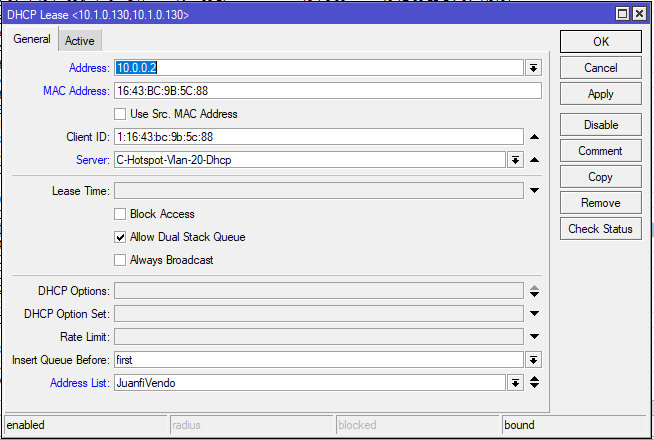
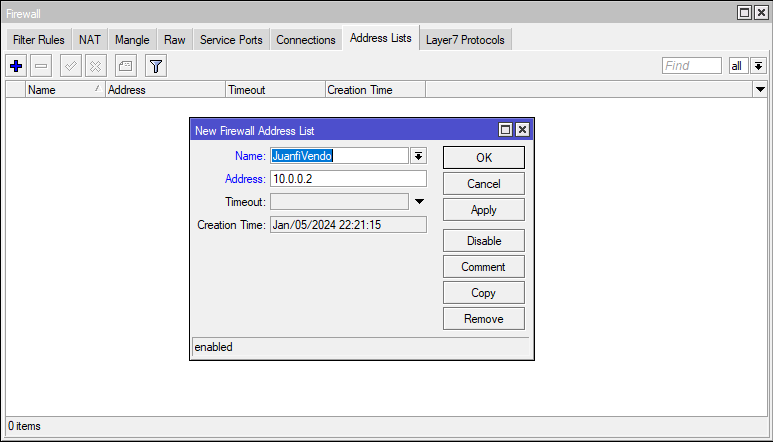
Use the MikroTik admin interface to add addresses dynamically:
Configuration:
- Address:
<vendo_ip_address> - Address List:
JuanfiVendo - Comment: (Optional) Add vendo name or location for reference
Tip: Use descriptive comments like "Vendo-Front-Desk" or "Vendo-Entrance" to identify each Vendo location.
Option B: Terminal/Script Method
For each Vendo IP, execute this command in the terminal:
/ip firewall address-list add address=<vendo_ip_address> list=JuanfiVendo comment="Vendo Location"
Example:
/ip firewall address-list add address=192.168.1.50 list=JuanfiVendo comment="Vendo-Front"
/ip firewall address-list add address=192.168.1.51 list=JuanfiVendo comment="Vendo-Back"
Step 2: Apply Walled Garden Rules
The Walled Garden feature allows certain devices to access specific services (like login pages) before hot spot authentication.
Execute this command:
/ip hotspot walled-garden ip add action=accept disabled=no dst-address-list=JuanfiVendo
What this does:
- Permits Vendo devices to bypass hotspot authentication for admin access
- Ensures Vendos can communicate with the management system
- Allows time synchronization and updates
Step 3: Configure Firewall Filter Rule
This firewall filter allows incoming traffic to Vendo devices:
Execute this command:
/ip firewall filter add action=accept chain=input place-before=0 comment=JuanfiVendo src-address-list=JuanfiVendo
What this does:
- Accepts all incoming packets from Vendo addresses
- Places rule at the top (highest priority) of the input chain
- Enables communication with Vendo devices over the network
Important: The place-before=0 parameter places this rule at the top. If you have other critical rules, adjust this parameter accordingly.
Verification
After completing these steps, verify your configuration:
✅ Check Address List:
/ip firewall address-list print
Should show all your Vendo IPs in the JuanfiVendo list
✅ Check Walled Garden:
/ip hotspot walled-garden ip print
Should show JuanfiVendo in the list
✅ Check Firewall Rules:
/ip firewall filter print
Should show the JuanfiVendo input rule at the top
Troubleshooting
| Issue | Solution |
|---|---|
| Vendo can't access network | Verify all Vendo IPs are in the address list, check firewall rules aren't blocking traffic |
| Duplicate addresses in list | Use /ip firewall address-list print to check, remove duplicates manually |
| Vendo still requires authentication | Ensure walled garden rule is enabled and references JuanfiVendo list |
✅ Complete!
Your Vendo address list is now configured. You can now reference JuanfiVendo in other firewall rules, QoS policies, and management scripts.